


With how powerful apps and phone features have become nowadays, even larger batteries on newer phones can still struggle to get through a full day of use.
Beyond that, the weaker a phone's battery health is, the weaker the device’s resale value becomes.
In this article, I’ll walk you through the best ways to optimize your phone’s battery life for both long-lasting daily usage and better overall battery health.
Best Ways To Make Your Battery Last Longer:
1. Check Your Battery Usage and Health:
Start by identifying which apps are consuming the most battery. Go to Settings → Battery → Battery Usage.
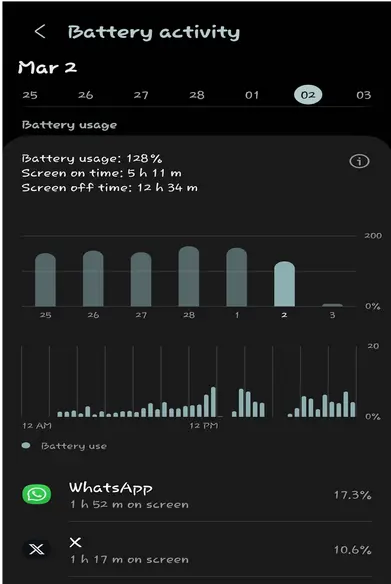
This usually reveals two things:
- Apps you use most frequently appear at the top, helping you understand your usage pattern.
- Some apps may drain power in the background without your knowledge.
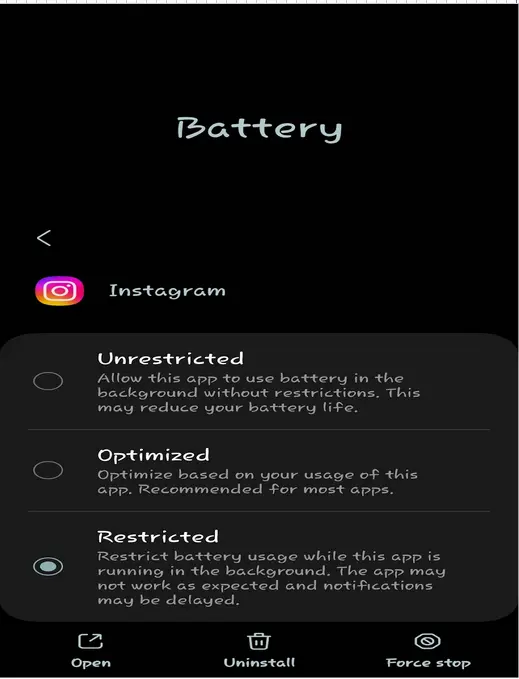
If an app is consuming too much power, restrict its background activity, delete it if unnecessary, or put it to sleep/freeze if your device supports it.
2. Optimize Your Display Settings:
1.Use Dark Mode
Your display is the biggest battery consumer on your device, so if you have an OLED screen, then dark mode is a good way to cut power consumption down a few notches.
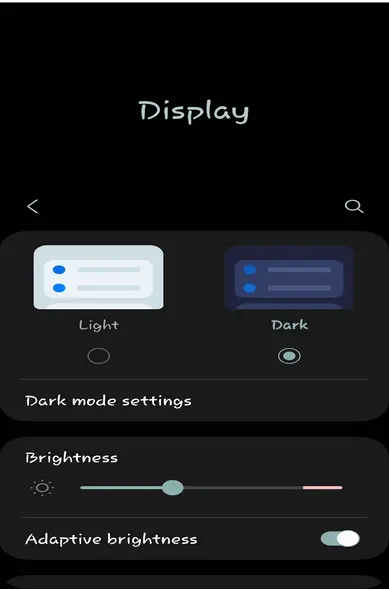
Dark mode helps save battery because black pixels are turned off, not just dimmed.
2. Optimize Display Performance
🔆 Enable Auto-Brightness
Your phone automatically adjusts screen brightness based on your surroundings. It dims in dark environments and brightens outdoors, helping reduce unnecessary battery drain.
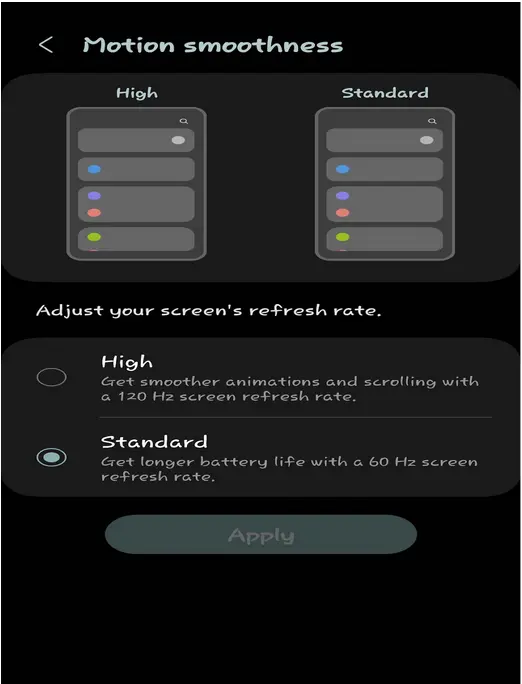
📉 Reduce Refresh Rate
High refresh rates like 120Hz or 90Hz consume more battery. Switching to 60Hz can significantly improve battery life, and most users won’t even notice a difference in daily use.
3. Advanced Display Optimization
3: Control Background Apps & Refresh Activity:
Background apps silently drain your battery by refreshing content, tracking location, and syncing data.
| Issue | Impact | How to Save Battery |
|---|---|---|
| Background App Refresh | Keeps apps active even when unused | Disable refresh for non-essential apps |
| Location Tracking | Constant GPS usage drains power | Allow location only while using app |
| Social Media Sync | Frequent updates in background | Restrict background activity manually |
4. Watch Your Charging Habits:
How you charge your phone can place significant stress on your battery and actually affect your health over the long run.
| Bad Charging Habits | Good Charging Habits |
|---|---|
| Charging to 100% regularly/ constantly topping up unnecessarily; this places undue stress on your battery. | Charge between 20% and 80% for optimal battery health. |
| Using cheap/non-certified chargers and cables | Use certified chargers and cables from reputable brands. |
| Keeping your phone at full charge (100%) or completely drained (0%) for long periods puts extra stress on the battery. | Charge in a cool environment and avoid heavy usage while charging. |
| Using your phone while it’s charging; this produces extra heat, which is bad for battery lifespan. |
Enable fast charging only when needed, and unplug once it reaches a healthy charge level. Use optimized charging; automatically stops charging your phone at 80% |
5. Quick Battery Optimization Tips
🌡️ Avoid Extreme Temperatures
I mentioned earlier that heat is bad for your battery, but the same applies to extreme cold. Both high and low temperatures put significant stress on your battery, reducing its lifespan and performance. Try to avoid using or charging your phone when it’s very hot or freezing cold.
📶 Use Wi-Fi More
Mobile data drains more battery than Wi-Fi because your phone uses extra power to maintain a strong connection with distant cell towers, especially on 4G or 5G, while Wi-Fi is closer and much more efficient. So use Wi-Fi as much as possible.
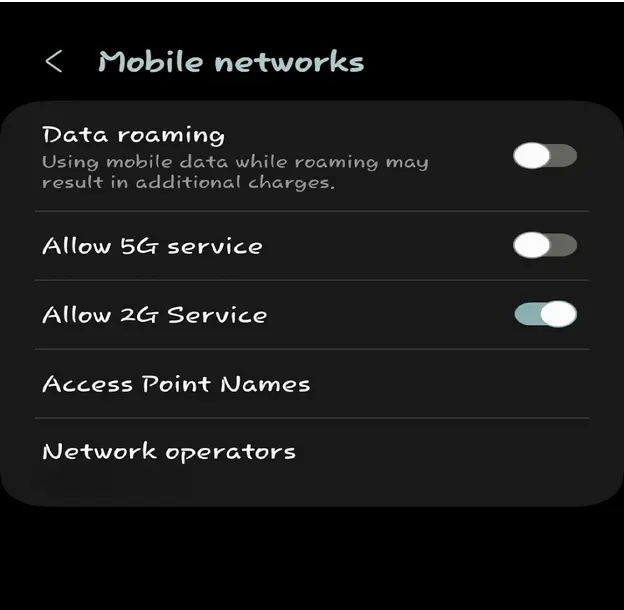
🚫 Disable 5G
5G uses significantly more battery than 4G, typically draining 6-11% more battery and up to 15-30% more drainage in poor signal areas. So if the gains of 5G aren’t worth the battery drainage for you, simply disable it.
6. Optimize Notifications:
Unnecessary notifications constantly wake your screen and drain battery power.
📱 Non-Essential Apps
Disable notifications from apps that are not important to reduce background activity and screen wake-ups.
⚡ Screen Wake Impact
Every alert turns on your screen briefly, consuming extra battery throughout the day.
Final Thoughts: Extend Your Phone Battery Life the Smart Way
Optimizing your phone’s battery isn’t about sacrificing performance it’s about intentional and smart usage. By adjusting display settings, managing background activity, and following healthy charging habits, you can significantly improve both daily performance and long-term battery health.
Simple changes like keeping your charge between 20% and 80%, reducing background apps, and avoiding extreme temperatures can help your device last longer and perform better over time.
A healthier battery doesn’t just improve usage it also helps you get a better resale value when selling your phone.
Pro Tip: If you're planning to upgrade, check your device value and explore the best offers on Sell My Cell Phone. You can also explore more guides in our Blog for smarter device management tips.